The following methods can be used to hack / crack / reset Windows Administrator Password in case you forgot it:
Showing posts with label Windows Vista Solutions. Show all posts
Showing posts with label Windows Vista Solutions. Show all posts
Wednesday, October 31, 2012

Hack, Crack Windows 7 Admin, Administrator Password
The following method is tried, tested and successful of cracking Windows 7 Administrator Password:
Please visit the link below and download the required utility viz. Offline NT Password and Registry Editor:
http://www.pogostick.net/~pnh/ntpasswd/
& follow the Step by Step instruction here:
http://www.pogostick.net/~pnh/ntpasswd/walkthrough.html
Hope that helps. I've executed this solution myself, if in doubt feel free to post comment; if I can I shall help.
Please visit the link below and download the required utility viz. Offline NT Password and Registry Editor:
http://www.pogostick.net/~pnh/ntpasswd/
& follow the Step by Step instruction here:
http://www.pogostick.net/~pnh/ntpasswd/walkthrough.html
Hope that helps. I've executed this solution myself, if in doubt feel free to post comment; if I can I shall help.
Saturday, April 2, 2011
BOOTMGR is compressed. Press Ctrl+Alt+Del to restart - What to do?
I just tried to install Windows 7 (32 bit) Ultimate edition on my friend's 4 year old Toshiba Satellite Laptop. Firstly I created another D:\ (can be any label of your choice.. E:\, F:\ etc...) Primary Partition from the default single C:\ drive partition. For installing an OS, a Primary Partition is recommended.
The installation went fine until the time the computer restarted? & Lo!!! I got this queer BOOTMGR error!!!!!!!!!!!!
After Googling here and there for the solution... I eventually arrived at one. Follow the steps below:
1. First go to your BIOS (at the time of restart) by pressing F2 and change your Boot Priority to CD\DVD.
2. Save and Exit and the computer will restart. An option like "Press any key to boot from CD will be displayed on your screen.... " Press any key.... After sometime the windows Installation Menu will appear.. Select your option (which is not important... I mean any option can be selected..") and click next...
3. Click 'Repair my Computer'
At the prompt to select your OS installation, click the button that says 'Load Drivers'. This should bring up a explorer-style drive browser.
Then just right-click on the drive you tried to compress, and deselect 'Compress this Drive', which should still be ticked on. Hit apply, and apply to subfolders/files. Usually it must be the C:\ drive.. You can go to your C:\ drive by clicking on My Computer or Computer... Once the C:\ drive is displayed.. Right click on it.. Select Properties.. and then Uncheck "Compress this drive to save disk space" & Reboot.
Your Problem should resolve!!!!
The installation went fine until the time the computer restarted? & Lo!!! I got this queer BOOTMGR error!!!!!!!!!!!!
After Googling here and there for the solution... I eventually arrived at one. Follow the steps below:
1. First go to your BIOS (at the time of restart) by pressing F2 and change your Boot Priority to CD\DVD.
2. Save and Exit and the computer will restart. An option like "Press any key to boot from CD will be displayed on your screen.... " Press any key.... After sometime the windows Installation Menu will appear.. Select your option (which is not important... I mean any option can be selected..") and click next...
3. Click 'Repair my Computer'
At the prompt to select your OS installation, click the button that says 'Load Drivers'. This should bring up a explorer-style drive browser.
Then just right-click on the drive you tried to compress, and deselect 'Compress this Drive', which should still be ticked on. Hit apply, and apply to subfolders/files. Usually it must be the C:\ drive.. You can go to your C:\ drive by clicking on My Computer or Computer... Once the C:\ drive is displayed.. Right click on it.. Select Properties.. and then Uncheck "Compress this drive to save disk space" & Reboot.
Your Problem should resolve!!!!
Tuesday, February 8, 2011
Why you should use Microsoft Security Essential?
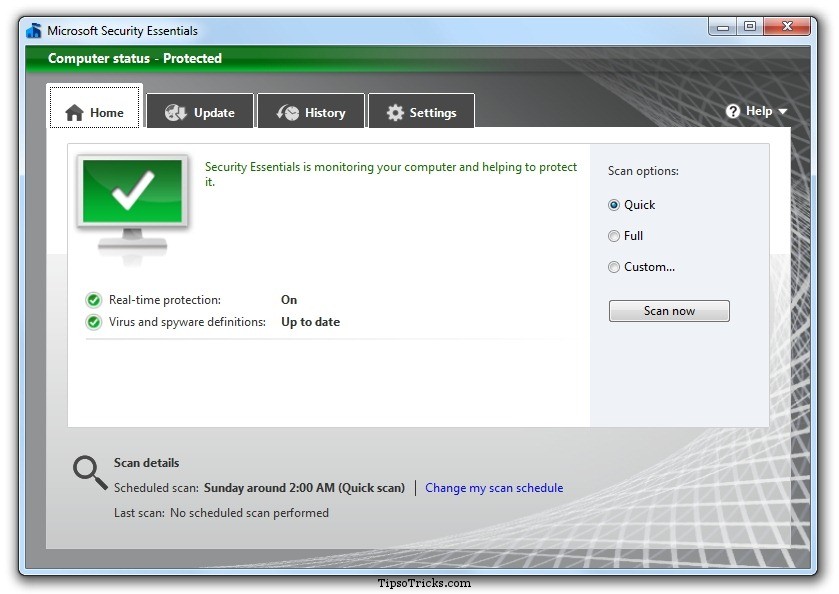
I've used many anti-virus(s) over the years gone by ranging from McAfee, Eset Nod32, Kaspersky etc.. Few months back I became aware of this awesome, cool anti-virus provided by Microsoft christened Microsoft Security Essentials and surprisingly all for FREE!!! Yeah, get that RIGHT... it's all free... provided you own a Genuine Microsoft Windows XP, Vista, 7 (32 bit | 64 bit) software or you have this version of Microsoft Windows 7 http://soluzione08.blogspot.com/2011/02/windows-activation-technologies.html
Once you start using Microsoft Essential you'll be saving your time and money and experience many other good things:
1. *Free so no need to look for crack, hacks and keygens.
2. No need to Renew your Subscription yearly
3. Quite light and so won't Put much load on your system "enhancing your computer usage experience."
& lots more .. so what you waiting for.. get a copy of your Security Essential right here.. Download Security Essential
Note: Remember to download the right version of the anti virus (32 or 64 bit) depending on your Operating System!
Subscribe to:
Posts (Atom)
Top 5 Posts (Weekly)
-
What is STATCOUNTER ? A free yet reliable invisible web tracker , highly configurable hit counter and real-time detailed web stats . In...
-
 If you have a form where you have declare a input type as below: <input type="number" name="quantity" min="1...
 -
If you are unable to suspend your laptop, here's the solution which I've tried & tested and it worked with my Lenovo Thinkpad T4...
-
Solved by re-installing: curl -sS https://dl.yarnpkg.com/debian/pubkey.gpg | sudo apt-key add - echo "deb https://dl.yarnpkg.com/d...
-
 Don't know why Mageplaza haven't still listed the composer name of their paid extensions. Look at the comment section of thi...