If you have been getting the following error "
Thunderbird Could Not Get Password," and because of this have been unable to log into your Email Account or Send Emails, you can try the solution below that worked for me.
>> Close your Thunderbird Email Client. Goto your Home folder and
Press CTRL+H to view hidden folders, or in your Menu, goto
View >> Show Hidden Files.
![[SOLVED] - Thunderbird Could Not Get Password for Ubuntu](https://blogger.googleusercontent.com/img/b/R29vZ2xl/AVvXsEiAP9bEqlwfyDv_nxWnZzT6fzOunpgnYnlEB3h0IOzBw8ue3kA9K9Mt8sYqbw9nYfFH7g_4en6DXpGJSiKJxvFQA5Yv8UdHVdv-3HDf8B9Sr_Yvg8A7lg00QJGbrEYwNx04M2tfdIwou-Kd/s320/Selection_003.png) |
| Click on image to enlarge |
>> Click on the
.thunderbird folder.
![[SOLVED] - Thunderbird Could Not Get Password for Ubuntu](https://blogger.googleusercontent.com/img/b/R29vZ2xl/AVvXsEjl8kZrJG3Ne-1K_JW7cEHtNX2qZxnuKrlp1tDWrKoCJpJpgfVmz0G1Uu3sY4bDE2TxzlA4mk_zMdkH5fGyTSqYt3bGlhjM_2fOXds4vz2PW4tWUhpF2eYU1_aPJ4vWGFVKlkXKHMAyozGu/s320/Selection_004.png) |
| Click on image to enlarge |
>> Click on the
shbh8pem.default folder.
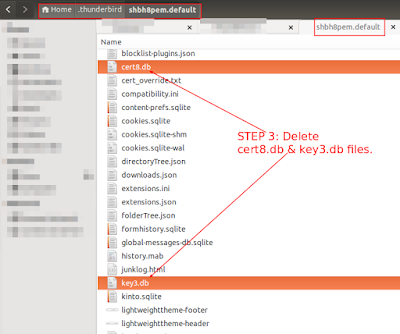 |
| Click on image to enlarge |
>> DELETE the following two files as highlighted in the image above:
Now OPEN Thunderbird and press F5 to Send/Receive Emails. If it prompts for a password enter it.
>> Try SENDING an Email from. If it prompts for a password enter it.
>> If the above solution doesn't work, RESTART your system, and repeat the steps above.
>> Your problem should have been resolved now.
![[SOLVED] - Thunderbird Could Not Get Password for Ubuntu](https://blogger.googleusercontent.com/img/b/R29vZ2xl/AVvXsEiAP9bEqlwfyDv_nxWnZzT6fzOunpgnYnlEB3h0IOzBw8ue3kA9K9Mt8sYqbw9nYfFH7g_4en6DXpGJSiKJxvFQA5Yv8UdHVdv-3HDf8B9Sr_Yvg8A7lg00QJGbrEYwNx04M2tfdIwou-Kd/s1600/Selection_003.png)
![[SOLVED] - Thunderbird Could Not Get Password for Ubuntu](https://blogger.googleusercontent.com/img/b/R29vZ2xl/AVvXsEjl8kZrJG3Ne-1K_JW7cEHtNX2qZxnuKrlp1tDWrKoCJpJpgfVmz0G1Uu3sY4bDE2TxzlA4mk_zMdkH5fGyTSqYt3bGlhjM_2fOXds4vz2PW4tWUhpF2eYU1_aPJ4vWGFVKlkXKHMAyozGu/s1600/Selection_004.png)


![[SOLVED] - Delete Categories in Magento 2 using MySQL & phpMyAdmin](https://blogger.googleusercontent.com/img/b/R29vZ2xl/AVvXsEhy2KnDxWscD4VeNMKuwqubRWS8LbuojEtaTzTrCwqp9pUE0N8wkoeFGt-rEkvQ_IWdcWua2sTfmvAxhzGiVKmNWhYBY5KPrVAyJNkquOaeBMnQxf7bDyugy1R7stmO3X0YMZ_j48OOfISj/s1600/Selection_001.png "[SOLVED] Delete Categories in Magento 2 using MySQL & phpMyAdmin")

